

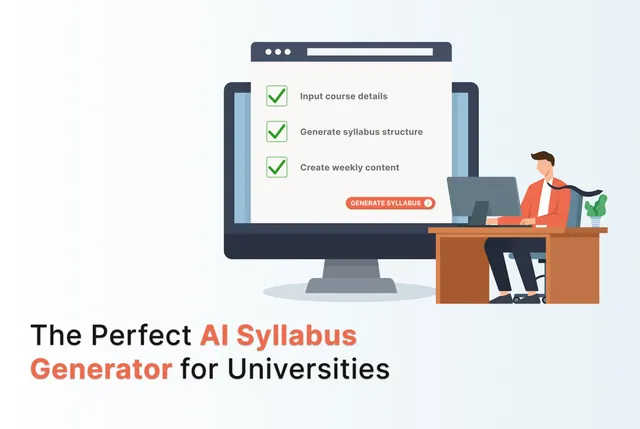
A strong university course syllabus requires time, clarity, and careful alignment. Because professors' schedules are already packed, the course design process needs to be streamlined. AI syllabus generators can make this a much easier and more efficient task. Instead of days, the AI takes some hours to create a structured, outcome-aligned syllabus. Besides speeding up the initial stages, it also makes course creation much more efficient by ensuring academic alignment and reducing repetitive work. This gives professors more time to research and teach. Creating a system that adapts to the professor's needs and feedback is important for an AI syllabus generator to create accurate syllabi. 1 Relying solely on large databases of educational materials and massive neural network training can not achieve this. Let's look at some AI syllabus generators to help you do this for a smarter workflow.
What is an AI Syllabus Generator?
An AI syllabus generator is a tool that helps educators create structured, professional course outlines in much less time. By entering a few key details - the course topic, objectives, schedule, or policies - the AI creates a nice, customizable course syllabus. It is aligned with learning goals, assessment plans, and suggested timelines. University professors can focus on student support when all of this document formatting is taken care of.
Sometimes professors just need to refresh existing content or make tailored lessons for different student groups. This administrative load can also be reduced by using an AI curriculum generator. Due to the flexibility of these tools, modern educators and instructional designers are using them to work smarter.
How Does the Syllabus Generator Work?
- Collects your inputs: The teacher enters the course title, subject, level, and term length. The AI also needs to know key topics, learning outcomes, policies, and any relevant course materials.
- Builds a structured outline: The AI analyzes the inputs and drafts a logical structure with modules or weeks, learning goals, topics, assignments, and assessment methods. It can also suggest grading schemes and standard sections like academic integrity or accessibility.
- Drafts detailed content: Using large language models, the tool writes descriptions, weekly plans, sample assignments, and assessment ideas aligned with the outcomes. Some tools also map to standards or accreditation requirements automatically.
- Customizes and exports the syllabus: Professors can adjust section lengths, tone, and difficulty. This final edit helps the course stay aligned with academic and accessibility standards. Once the instructor is satisfied with the draft, they can export the syllabus. It can be a pdf, docx, Google docs or LMS-ready file.
Benefits of Using AI Syllabus Generators
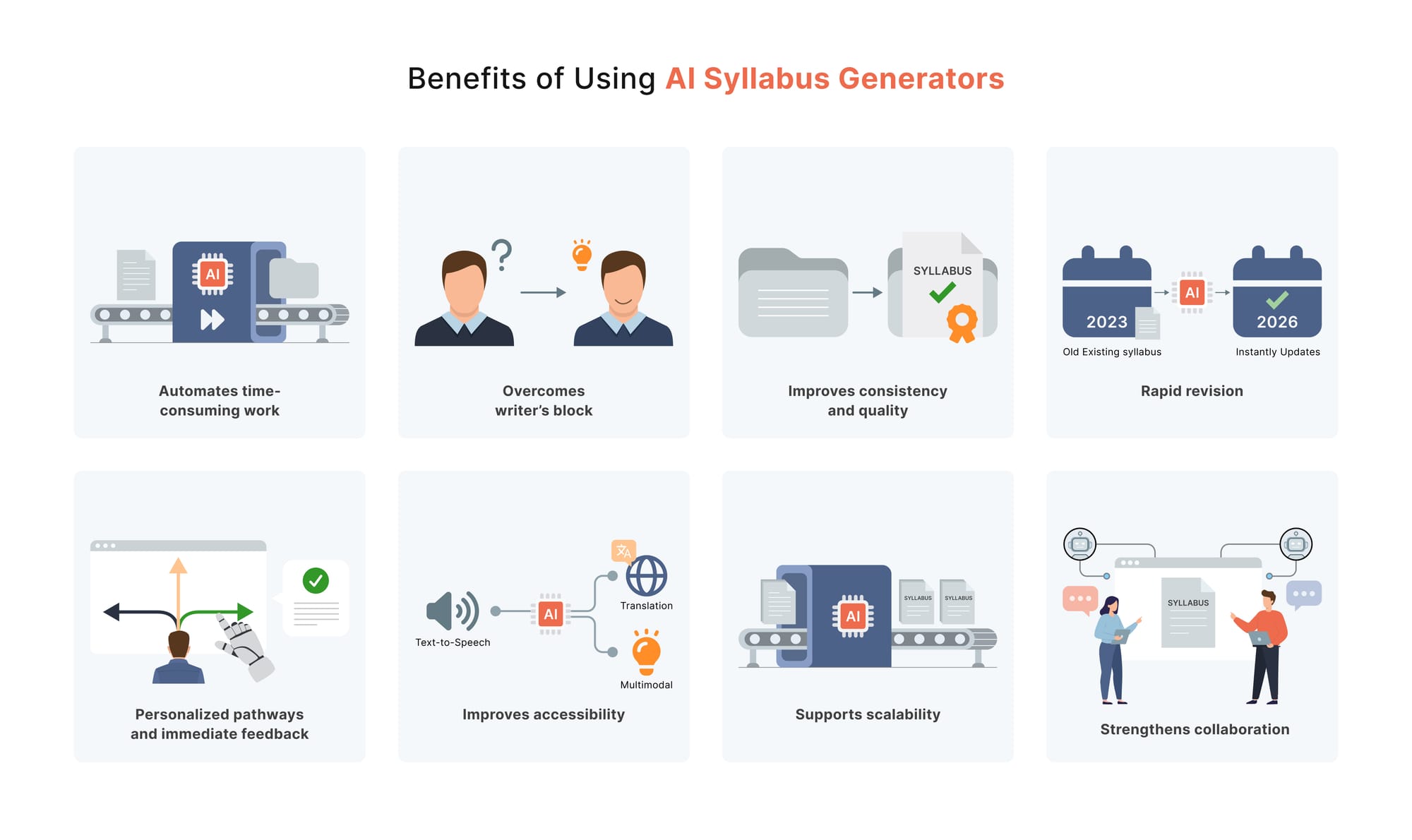
Curriculum development can get faster and more efficient for professors if they start incorporating AI into their course design process. Here’s how an AI syllabus maker helps students and educators:
- Automates time-consuming work by generating structured syllabus outlines, objectives, assessments, and content in minutes. Doing all this work manually increases teachers’ workload, and this time can be used to engage with learners directly.
- Helps teachers overcome writer’s block by providing ready-made drafts. They can quickly refine this to make sure there is no misalignment. Collecting materials and finding starting points is much more difficult. Harvard Business Impact notes 2 that even if you do not use the suggestions made by ChatGPT for course design, it can still serve as a starting point, which is better than a blank slate.
- Improves consistency and quality with templates aligned to academic standards and error-free formatting. Maintaining this high-quality instruction is important for universities to uphold their reputation.
- Courses need to be updated according to changes in standards or learner needs. AI syllabus generators can update them quickly. AI is especially strong at providing scaffolded support. It can suggest prerequisite reviews, warm-up tasks, and helpful transition activities that guide students through complex concepts one step at a time. This rapid revision also enables faster course launches - ideal for fields that evolve quickly and require continuous updating.
- AI-generated courses enhance student learning through personalized pathways and immediate feedback. A trial conducted at Vietnam National University found that the AI-based curriculum increased student engagement by 40% and improved average test scores. 3 Furthermore, most AI platforms also provide built-in analytics to track learner engagement, so this can help iterate on courses for efficiency.
- AI-generated syllabi can improve accessibility with automatic generation of multimodal content, translation, or text-to-speech. A 2025 study 4 shows that Wushu courses redesigned by AI led to better learning and higher student motivation compared to traditional classes. Teaching effectiveness improved by about 7%, and students showed 9% more initiative.
- Supports scalability so institutions can expand courses or programs efficiently.
- Strengthens collaboration by making syllabi easy to share, co-edit, and review with teaching teams.
Key Features to Look for in an AI Syllabus Generator
A good syllabus provides an organized and meaningful learning experience. It should convey why the course matters and how students can succeed. This is how it acts as a shared understanding between the instructor and the students. Check with the following list to make an informed choice:
Strong Pedagogical Design
Choose a generator that reinforces learning rather than replacing cognitive effort. Tools should require initial student attempts, comparison, and reflection, mirroring the “Coach not Crutch” model that improved learning outcomes (Lira et al., 2025).
AI-generated content should integrate into structured learning activities, not stand alone, because unguided AI use can undermine durable learning (Prather et al., 2024; Marzouki et al., 2024; Tavakol et al., 2024). Edvisor makes sure that assessments encourage higher-order thinking. We’ll go through its features to see how it fits higher ed needs perfectly.
Academic-Ready Templates and Standards Alignment
A high-quality generator includes professionally structured templates that:
- Follow university norms (objectives, weekly plans, policies, assessments).
- Align learning outcomes with activities and assessment types automatically.
- Provide space for academic integrity, AI-use policies, accessibility statements, and instructor information.
Customization and Editability
The tool must allow instructors to refine the AI draft easily. Look for:
- Adjustable tone, detail level, and section length.
- Editable objectives, schedules, workload expectations, and policies.
- Option to rewrite parts of the syllabus without disturbing the overall structure.
Research stresses that human oversight is essential. AI without instructor revision can introduce inaccuracies or misaligned content (Automated Feedback Review, 2024; Ahmed et al., 2025).
Support for Specific Course Type
The generator should be able to handle course content related to the level and discipline of your course. Also, check if it fits the format of course delivery that the course offers: lecture, seminar, hybrid, or online. There are also further requirements for courses like project-based or inquiry-based course structures, so make sure the generator supports that.
LMS Integration for Easy Deployment
A good AI syllabus generator should export cleanly to:
- Canvas
- Blackboard
- Moodle
- Google Classroom
This ensures a smooth workflow between syllabus creation and course setup.
Automated Reading & Resource Suggestions
Look for tools that suggest readings or multimedia resources based on course topics. AI excels at scaffolding these elements, helping students build knowledge step-by-step.
High-Quality AI-Generated Assessment Suggestions
Research shows AI-generated questions can be powerful if reviewed, but risky if deployed unchecked. The system should be able to generate formative practice questions, rubrics, and assessment ideas. Avoid tools that expect you to use AI-generated assessments without verification.
Transparency, Reliability, and Trustworthiness
Because proprietary AI models can be opaque, the best generators provide clear explanations of limitations. Studies show unverified AI outputs can damage credibility and reduce learning (Tavakol et al., 2024).
Accessibility & Inclusivity Features
Important capabilities include clear formatting for easy readability. Options for tone adjustments (formal, student-friendly, supportive) should be available. Text-to-speech or alternative formats for accessibility are also essential.
Flexible Export Options
Ensure the syllabus builder allows export in multiple formats, such as:
- DOCX
- Google Docs
- LMS-ready files
This makes sharing and updating simple.
Final Recommendation
Professors should use a dedicated syllabus tool for structure and then refine or expand sections. One final check for accuracy, learning alignment, and institutional standards is important. Edvisor makes this entire process extremely simple by providing a clear alignment process to make sure professors are satisfied before their AI coursepack is launched.
How to Make a Syllabus with Edvisor
If the professor already has a course syllabus ready, they wouldn’t need to use the ‘Syllabus Generator’ AI tool in Edvisor to create their AI coursepack. So when a professor needs to start from scratch, or maybe make some adjustments in their syllabus according to new policies, they can follow these steps:
Step 1: Head to AI Tools
The ‘AI tools’ section in the left menu has a library of AI tools to help teachers optimize their workflows. One of these is the Syllabus Generator. Let’s see how you can use this tool.
Step 2: Enter Your Inputs
Provide the following inputs for the AI so it can create a well-aligned course curriculum:
- Subject
- Course description
- Course objectives
- Required materials
- Grading policy
- Class policies / Expectations
- Course outline
- Grade level
- Any additional instructions
Step 3: Click ‘Generate Syllabus’
Based on your input, the AI Syllabus Generator will create a curriculum course. It works on the course outline and elaborates it according to the objectives of the course.
Step 4: Refine
If the syllabus is not as per the requirements, the professor can still converse with the AI and make the necessary changes. There’s also an option to regenerate and refine the output. This could be anything, like the tone, format, or instructional style of the course. If the Course Outline entered as an initial input was not detailed enough, it can still be updated to create a better syllabus.
Step 5: Export
Once the syllabus has been finalized, it can be copied and pasted into any document editor or LMS. Export it into the format from there.
Step 6: Create a Course with Edvisor
Now that the syllabus has been generated, it can be used to create an entire course with Edvisor’s AI.
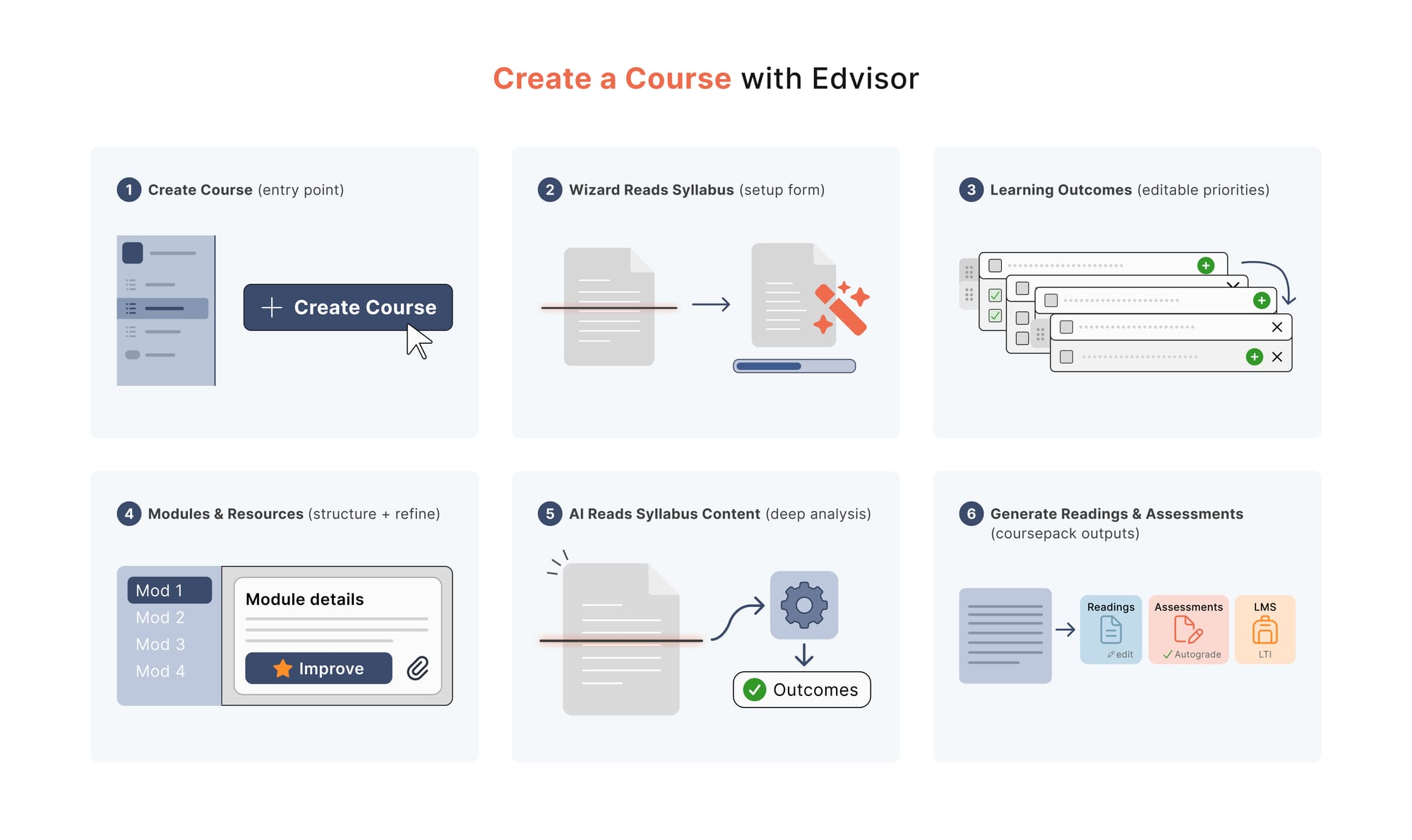
- Go to ‘Courses’ (in the left panel) and click ‘Create Course’ on the top right of the screen. The AI will then ask for the course name, level, and the syllabus file (pdf or TXT). Edvisor is FERPA compliant and does not use the teachers’ or students’ data to train its AI model. Furthermore, all the material used to create the readings is verified, so the AI outputs are not like a general-purpose AI. This AI is built with pedagogical intent.
- Welcome to the Course Creation Wizard! The AI will take a minute to read the syllabus and fetch its details. A screen will appear with the course description and a form to enter the number of modules, the level of quantitative material in the course, and the amount of coding involved.
- From this, the AI then generates course learning outcomes. They can be moved up and down according to the professor’s priority. They can also add and delete any outcomes.
- The fourth step involves module generation. All the learning outcomes are used to create this structure. On the left side of the screen, the modules are listed, and the professor still has the choice to edit their placement or add a new one. The ‘Improve’ button at the top can further refine these modules. On the right side of the screen, the module’s description and learning objectives are displayed. Any resources or materials specific to the module can be added (documents or videos).
- After the modules are created, they are used to create the readings. Simply select the modules to be used for the course creation, click ‘Complete Alignment’ and wait for 1-10 minutes.
- Readings are editable for the course creator and can be customized at any point
- These readings have YouTube video suggestions, an audio podcast format, and the students can also interact with the text through the AI chat. This AI is trained on the teacher’s material and gives them accurate knowledge about the concepts they inquire about
- All readings provide an ‘end-of-the-chapter’ reflection section and questions to serve as a knowledge check
- As the AI is curriculum-aligned, all assessments created for students will be aligned to fulfill the learning outcomes of the course. There is an option to edit these assessment questions as well.
- Assessments (quizzes, short answers, discussion questions) are autograded according to the grading criteria of the professor. The grades can be imported into an LMS through LTI integration. The AI also gives them instant feedback, and the professor can also measure their response level through the analytics. Edvisor’s assessments are AI-resilient and encourage students to use AI responsibly to build a true understanding of the core course concepts. Learners can even earn back points in assessments by conversing intelligently with the AI (if the professor activates the ‘Grade Recovery’ feature.
Ready to Try Edvisor?
Start Streamlining Course Design with Edvisor
A thoughtful syllabus will always need a professor’s expertise, and AI can make the process more efficient. The right AI syllabus creator can support course design and reduce repetitive work. Choosing a tool built for higher education (that is built for accuracy and transparency) is essential.
Edvisor’s syllabus generator does exactly that. Its pedagogical structure with a curriculum-trained AI allows professors to move from a blank page to a customizable syllabus in minutes. From there, it can even build full AI-powered coursepacks aligned with outcomes and assessments.
For universities ready to modernize course design while keeping faculty in control, an AI syllabus generator isn’t just helpful, it’s becoming indispensable. Edvisor makes this transition simple, reliable, and built for the realities of higher education.
FAQs
Can AI Create a Syllabus?
While a syllabus shouldn’t be created entirely by generative AI, it serves as a valuable support tool. So it can help streamline the process and strengthen the overall course design.
Can ChatGPT Create a Curriculum?
Yes, ChatGPT can definitely help with curriculum design. However, it requires the right prompts to draft course outlines, lesson plans, and learning objectives. One problem with this is that the teacher can not be sure where ChatGPT is getting its information from.
How Do I Develop a University Curriculum?
Designing a full course means working through six key stages. It starts with reviewing QAA subject benchmark statements, then defining course aims and outlining course-level learning outcomes. These are broken into module outcomes, followed by creating aligned assessment tasks and planning the teaching activities and resources that support them, all ensuring a coherent and academically sound course.
Citations
- M. Alier, F.-J. García-Peñalvo, and J. D. Camba, “Generative artificial intelligence in education: From deceptive to disruptive,” Int. J. Interact. Multimedia Artif. Intell., vol. 8, no. 5, p. 5, 2024
- Weiss, M. (2023, July 27). If your syllabus needs a refresh, generative AI can help. Harvard Business School Publishing – Inspiring Minds.
- Li, Y. (2025). Application of artificial intelligence in the curriculum design of Wushu MOOC teaching in colleges and universities. International Journal for Housing Science and Its Applications, 46(3), 8647–8656.
- Long, T.T., Lam, N.T., Cuong, T.Q. (2025). AI Integration into Curriculum Design and Development: Theoretical Framework and Application. In: Pal, S., Rocha, Á. (eds) Proceedings of 4th International Conference on Mathematical Modeling and Computational Science. ICMMCS 2025. Lecture Notes in Networks and Systems, vol 1399. Springer, Cham.