

AI Study Guide Makers: Smarter Support for Textbooks
Although textbooks remain the trusted foundation of learning content, there are fundamental issues. They are static, unimodal, and expect all students to learn in the same way.
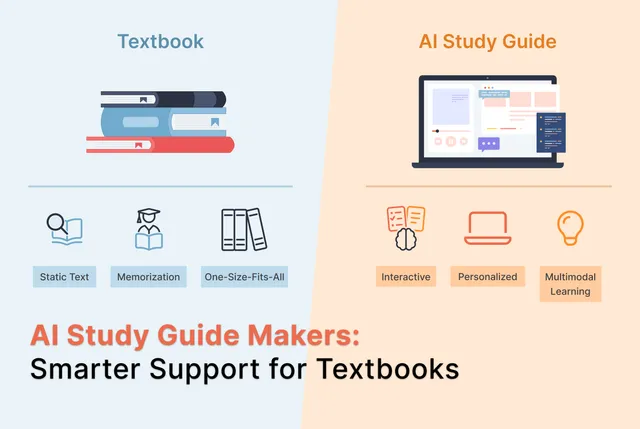
Although textbooks remain the trusted foundation of learning content, there are fundamental issues. They are static, unimodal, and expect all students to learn in the same way. Research indicates that traditional textbooks offer only a static reading experience, whereas modern AI study tools provide the dynamic engagement required by today’s students to retain information (Ateeq et al., 2024).
That’s where AI study guide makers feel like a genuine upgrade. It doesn't hand every learner the same chapter and hope for the best; they can turn course materials into interactive, personalized study support. While they study, it surfaces gaps, generates practice questions, and creates quicker feedback loops that support learning. Let's explore how AI can be used as an effective study tool.
The Problem with Textbooks
Textbooks are often expensive and become outdated fast, which widens access gaps. They’re also dense with information, and don't keep students engaged. Even digital textbooks can distract students with notifications. Having a static book creates a one-sided, passive learning experience.
- Textbooks are expensive. Big publishers keep releasing new editions and bundles, and many courses require online access codes that students have to buy. On average, students may spend over $100 on a single course. On top of that, specialized books sell to smaller audiences, so production is costly and competition is limited. Students often don’t have much choice and have to purchase it because the required title is set by the course.
- Old-school study habits don’t match how students actually learn best today. They push students toward rushing through memorization, instead of checking their understanding and working through confusion when it shows up.
- A simple test is this: if students can’t use what they learned in a new question or a real scenario, it doesn't really stick. Students need study support that helps them understand and remember, not just recall facts long enough to get through an exam.
What Is a Study Guide?
A study guide is a personalized summary of the most important material, organized in a clear, concise way so students can review multiple topics without feeling overwhelmed. It helps them retain information longer and study more efficiently, so they can spend less time revising while still getting strong results.
A great study guide does more than organize notes; it helps students learn actively. Edvisor provides an AI course assistant that stays consistent with the source material, so students don’t have to worry about missing key points or ending up with misleading summaries. There are also self-quizzes to make it easier to practice repetition and recall instead of just rereading.
When students study with more independence and confidence, it makes exam prep feel straightforward and intuitive.
Why an AI Generated Study Guide Is the Perfect Study Partner
Here are some great reasons to start exploring AI study guides for better learning:
Personalized to the Learner
Traditional textbooks are one-size-fits-all. AI study guides adapt content by re-leveling it to a learner’s grade and swapping in examples tied to their interests - so the same source becomes more relatable and easier to engage with. It has been discovered through empirical research that there is a significantly positive relation between the usage of AI assistants (or tutors) and academic performance based on the features offered by the platform that enable personalized interactions on a real-time basis that are not offered by static textbooks. (Ateeq et al., 2024).
More Effective Learning Outcomes (Measured Gains)
In the randomized study (60 students, ages 15–18), learners using 'Learn Your Way' (A Google Labs experiment that uses generative AI to turn textbook/PDF content into a more interactive, personalized learning experience) scored 9% higher on the immediate assessment than the digital-reader group. They also scored 11% higher on retention tests 3–5 days later (78% vs. 67%), showing stronger, longer-term retention.
Transforms Passive Reading into Active Learning
The “immersive text” experience breaks content into digestible sections and adds generated images and embedded questions. That shift - reading plus interaction - turns a static reading experience into an active one that follows learning science principles. A 2025 study comparing AI-generated study guides to dense textbook chapters found that the guides reduced total reading volume by 64.8%. These guides had high accuracy and clarity and were very clearly formatted (Patel et al., 2025).
Built-in Quizzing That Surfaces Gaps Early
Section-level quizzes are designed to promote active learning by letting users check understanding as they go. The interactive quizzes also provide dynamic feedback, which is extremely useful to guide learners with topics they struggle with.
Multiple Representations of the Same Content
Instead of relying on one format, the experience offers several: immersive text, slides with narration, audio lessons, and mind maps. This multimodal approach helps learners choose and helps them understand the same material from different angles. Building connections between different representations strengthens the conceptual schema.
More Enjoyment, Which Increases Adoption
In a large-scale study of 676 university students, Al-Abdullatif and Alsubaie (2024) found that perceived enjoyment is a primary driver of AI adoption, because these study tools for college students can turn passive study sessions into more gratifying, interactive learning experiences.
Better Quality Assurance through Expert Evaluation
When compared side-by-side with gold standard medical text references, artificial intelligence-created study guides reached near-perfect expert levels on clarity (3.36/4.0) and relevancy (3.64/4.0), thus authenticating these as a lower cost alternative. (Patel et al., 2025).
More Practical, Applied Learning in Domain-Specific Tools
In the medical field, for example, AI study guides can simulate real-life patient interactions so students can practice diagnosis and clinical reasoning with instant feedback. AI tools can be more dynamic and practical study tools for these domains.
Core Capabilities and Features of AI Study Guide Creators
Before providing students with AI study guides, it is important to know how their features work:
Dynamic Knowledge Mapping
AI study guide makers can build a “living” map of concepts by using NLP to identify key topics in your notes or source material, then connecting related ideas into a structured framework. As students answer questions or complete quizzes, machine learning can use those performance signals to update the map. It can add review nodes, highlighting weak links, and adjusting what the student sees next.
Machine Learning-Driven Recommendations
AI study guides can use machine learning to analyze how each student performs over time. What topics they understand, what they miss, and what they struggle to explain. The system can then recommend what to study next based on their weak and strong areas. The path evolves with their pace and needs rather than staying fixed.
Multimodal Learning Support
Multimodal support means the same topic can be presented in different formats - text explanations, audio narration, and visuals/video-style representations. NLP helps translate dense material into clearer language for better retention. Features like speech recognition and interactive simulations help students who learn better from “learning by doing.”
Real-Time Adaptation
Real-time adaptation is when the tool changes the difficulty and support as the student progresses. As they respond to questions, the system uses their performance data to simplify explanations, add examples, or provide extra practice when they’re stuck. If they’re doing well, it can introduce harder questions or move you forward sooner. This creates a tutor-like experience that keeps the challenge level “just right” in the moment.
Upload-And-Transform Inputs
AI study guide makers typically start by letting teachers upload notes, PDFs, or textbook chapters (even video or audio content in some tools). NLP then “reads” that material, pulls out the main concepts, and creates a usable structure. Instead of manually highlighting and rewriting, AI converts raw inputs into a format that’s easier to navigate and review.
Summaries and Key Takeaways
AI can condense long readings using NLP summarization into clear notes that students can use to revise. It does this by identifying the most important topics and reducing clutter. Shortening content is not the goal, they organize it into digestible sections, so students can understand the “shape” of a topic. This makes review faster and helps students focus on what matters most. Surveys indicate that 58.9% of surveyed university students now primarily use AI tools to summarize lesson content, bypassing the time-consuming process of searching through traditional information channels (Nguyen et al., 2024).
Auto-Generated Flashcards
Flashcards are usually created by extracting key terms, definitions, relationships, and examples from the source material using NLP. The tool then turns those into short prompts designed for repetition and recall. So learners can practice active retrieval instead of passive rereading. Over time, performance on flashcards can feed back into personalization, helping the system decide what needs more review.
Quiz and Test Generation
AI can generate practice questions directly from uploaded material by using NLP to identify learning objectives and convert them into question formats. These can be multiple choice, short answers, etc. As students attempt questions, machine learning can adjust the difficulty and choose what to ask next based on accuracy and patterns of misunderstanding. This turns quizzing into an ongoing learning loop. A 2025 study traces the shift from early “engineered” digital textbooks to Generation 5, where GenAI/LLMs actively generate and adapt content. The authors conclude that these GenAI-powered textbooks can auto-create assessment questions and make learning more interactive and social than traditional static formats.
Spaced Repetition
Some AI tools apply spaced repetition through context-aware scheduling: they analyze what you’re likely to forget and automatically schedule reviews right before that point. The system can prioritize “tough” topics more often and push “mastered” topics further out, so study time is used efficiently.
Interactive Tools (Chatbots, Speech Recognition, Simulations, Game-Based Learning)
Interactive study guides go beyond text. Chatbots can offer constant help, answer questions, or guide a student through a topic step by step. Speech recognition can enable spoken practice, while simulations and game-based elements create a more hands-on learning atmosphere that reinforces understanding in a practical way.
Progress Tracking
Progress tracking means the system monitors performance across quizzes, flashcards, and study sessions to flag where students are struggling. It can highlight weak areas, recommend targeted review, and give educators visibility into who needs extra support. With enough signal, machine learning can even help predict future performance. Instructors can then intervene earlier and students can focus their effort before they take the final exam.
AI Study Guide Maker and Textbooks: Different Roles, Different Value
The way university students learn is evolving and research data shows that 66.7% of surveyed students use AI for targeted study sessions of just 15 - 20 minutes, fitting learning into busy schedules (Nguyen et al., 2024). If AI is already assisting students, textbooks will soon become obsolete. Both studying mediums differ in the following ways:
How Professors Can Use AI Study Guides Without Losing Academic Rigor
Professors can absolutely use AI-generated study guides to support learning as long as they take a “human-in-the-loop” approach. That means letting AI handle the repetitive drafting and organizing while faculty provide the intellectual oversight. The goal should not be to reduce student effort but be able to use AI for scaffolding. Here are practical ways to implement academic rigour:
- Faculty can use AI to draft the structure of study guides. The content should always be sourced from their own materials so that it's verified. In addition to this, the tone and depth should be aligned to the course level.
- Instructors should emphasize process over product when making assessments with AI. With multi-step, higher-order questions, students develop metacognition and critical thinking. Professors can maintain rigor by grounding tasks in course-specific or personal context.
- Institutions and faculty should set clear AI-use policies and disclosure expectations, and prioritize approved or academic-focused tools to protect privacy and source quality.
How to Create a Study Guide for Students with Edvisor
Edvisor fits naturally into how professors already teach, turning existing course materials into structured study guides, practice questions, and feedback without adding extra admin work.
The syllabus, learning objectives, and other resources uploaded by the professor are used to give context to the AI. Edvisor fulfills these learning outcomes by creating readings and assessments. These readings are designed for multimodal learning and include interactive elements, podcasts, and YouTube videos. The content stays fully customizable to match course standards.
Here’s how students can use Edvisor as their own AI study guide generator:
Step 1: Open the Edvisor course
The student should confirm their professor’s readings are already available and they’re enrolled in the course
Step 2: Go to the Chat section
From the left panel, click Chat.
Add Course Material
Students can either:
- Select specific module(s)/section(s) from the assigned readings, or
- Upload materials they want to include.
Enter a Prompt
- Write a prompt telling the AI what kind of study guide to create. For example,
“Create a study guide for Module 3 from the selected readings. Include key concepts, definitions, a summary, 10 practice questions (mix of MCQs + short answer), and a short checklist of what I should be able to explain after studying.”
Generate the Study Guide
- The AI generates a ready-to-use study guide for the selected module(s)/sections.
- They can copy the guide and use it as a supplementary pre-exam prep resource.
Ready to Try Edvisor?
Start Empowering Students with AI Study Guides
At this point, the question isn’t whether students will use AI to study—it’s whether they’ll use it in a way that actually strengthens learning. Textbooks will continue to play an important role, but research has shown that static reading alone doesn’t meet the needs of today’s learners, especially when retention and application matter (Ateeq et al., 2024). AI study guides offer a more effective path forward. They make reviews more targeted, interactive, and aligned with how students retain information. As there is more practice and feedback, students can reinforce the same concept effectively.
With Edvisor, professors can bring those benefits into their course in a way that stays grounded in their own materials. Academic rigor also stays intact, and gives students the structured study support they’re already looking for. If you want students to study smarter, not just longer, creating your course in a study guide template with Edvisor is a practical next step.
FAQs
Can I Use AI to Make a Study Guide?
Yes, AI can definitely help in making a study guide. It can turn notes, textbook chapters, or lecture material into structured summaries, key concepts, practice questions, and even simple visuals. It saves prep time and makes studying more focused and efficient.
What Is the Difference between a Study Guide and a Textbook?
Study guides turn slides into notes, which is great for highlighting the key concepts, but in most modules, students still need to go beyond them. A textbook can add the extra context, examples, and deeper explanations students often need to handle unfamiliar or more challenging questions.
What Is the Average Cost of a Textbook?
College textbook prices can vary a lot, but new print editions often fall in the $100-$300 range. E-textbooks are usually cheaper, around $40-$150, and some estimates put the average cost per book at roughly $105.
References
- Ateeq, A., Ayyash, M. M., Milhem, M., Alzoraiki, M., & Alzaghal, Q. K. (2024). From textbooks to chatbots: The integration of ChatGPT in modern university pedagogy. Journal of Theoretical and Applied Information Technology, 102(4), 1419–1432. https://www.jatit.org/volumes/Vol102No4/11Vol102No4.pdf
- Patel, E. A., Herrmann, P. T., Fleischer, L., Filip, P., Joe, S., Kshirsagar, R. S., Kuan, E. C., Papagiannopoulos, P., Patel, Z. M., Rangarajan, S., Batra, P. S., & Tajudeen, B. A. (2025). Comparative analysis of AI-generated study guides in otolaryngology education. American Journal of Otolaryngology, 46(5), 104693. https://doi.org/10.1016/j.amjoto.2025.104693
- Al-Abdullatif, A. M., & Alsubaie, M. A. (2024). ChatGPT in Learning: Assessing Students’ Use Intentions through the Lens of Perceived Value and the Influence of AI Literacy. Behavioral Sciences, 14(9), 845. https://doi.org/10.3390/bs14090845
- Nguyen, T. N. T., Lai, N. V., & Nguyen, Q. T. (2024). Artificial Intelligence (AI) in Education: A Case Study on ChatGPT’s Influence on Student Learning Behaviors. Educational Process: International Journal, 13(2), 105-121. https://doi.org/10.22521/edupij.2024.132.7
- Sosnovsky, S., Brusilovsky, P. & Lan, A. Intelligent Textbooks. Int J Artif Intell Educ 35, 967–986 (2025). https://doi.org/10.1007/s40593-024-00451-9
